Production rules
What one request or job may do, checked on every kept trace - and alerts when a rule breaks.
Some bugs never throw. A retry charges a card twice, a new relation loads one row per product, an agent loop calls the model forty times - every request returns 200, every test passes, and the dashboards stay green until the invoice, the latency or a customer says otherwise.
A production rule writes down what one request or job may do - "checkout charges the payment provider exactly once", "the product list runs at most three queries", "no request makes more than five LLM calls" - and every kept trace is checked against it as it arrives. The trace that breaks it, and the release it came from, is in front of you the moment it happens. When an agent wrote the change, a rule is the cheapest review there is: one sentence of what production must keep doing, checked on every deploy without anyone re-reading the diff.
Rules are included in every paid plan, up to 25 per project, under Activity → Rules. If a plan lapses, its rules are kept but no longer checked, and checking resumes once the project is on a paid plan again.
Rules worth writing
| What must hold | The rule | What breaking it usually means |
|---|---|---|
| A payment is taken once | POST /checkout/:orderId/pay calls POST api.stripe.com exactly once |
A retry or a duplicated handler charging twice - or a refactor that stopped charging at all |
| The product list doesn't N+1 | GET /products runs pg SELECT products at most 3 times |
A relation now loaded once per row |
| An endpoint stays cheap to run | Every request makes LLM calls at most 5 times | A tool or agent loop that keeps calling the model |
| Admin changes are audited | PATCH /admin/users/:id calls AuditLogService.record at least once |
A new code path that skips the audit write |
| Searches use the cache | GET /search calls SearchCache.get at least once |
A change that bypasses the cache and queries the database on every search |
| A paid API is called sparingly | POST /addresses calls GET maps.googleapis.com at most once |
Geocoding inside a loop - a bill, not an error |
| A job sends one digest | The send-digest job calls POST api.postmarkapp.com exactly once |
A job retried after a partial failure, mailing everyone twice |
The best rules come from a change you just made: what did it have to keep doing? A rule written while you still know the answer keeps holding production to it long after the diff is forgotten. Pin as a rule starts one where the evidence is: on the Releases page, each query, outbound call or method a release added or multiplied opens the form with the call and a bound from the release's numbers, for you to give it the route. In a trace, a run of calls the agent folded into one span offers Guard with a rule, filled in for that trace's own route or job.
What a rule says
A rule reads as one sentence, and the form shows that sentence as you write it:
- The operation - one route and method (
POST /checkout/:orderId/pay), one job by name, or every request or every job. A route that hasn't been served yet is fine: the rule reads Unchecked until a kept trace of it arrives. - What it counts in each execution:
- Calls to a class or method - a provider method such as
PaymentsService.charge, or a driver's statement such aspg SELECT orders, named as the Services page names them. The form suggests the classes your traces ran in the last day, and once you pick one, its methods. - Outbound HTTP calls to a host -
api.stripe.com, optionally one method. A host named without a port matches it on any port. - LLM calls - every model call, or one provider's: OpenAI, Anthropic, Azure OpenAI and the rest, or a gateway you configured.
- Calls to a class or method - a provider method such as
- The bound - exactly, at most, or at least, a number of times per execution.
An upper bound (exactly, at most) is held by every execution, failed ones included. A lower bound (exactly, at least) is held only by executions that succeeded - no error, status below 400 - because a request that failed half way never got the chance to make its calls.
Only spans the agent records itself are counted; spans you open by hand never are. When more than 20 identical calls run in one execution, the agent keeps the slowest few and folds the rest into one span - a rule counts the folded calls at their real number, so an N+1 of fifty queries counts as fifty.
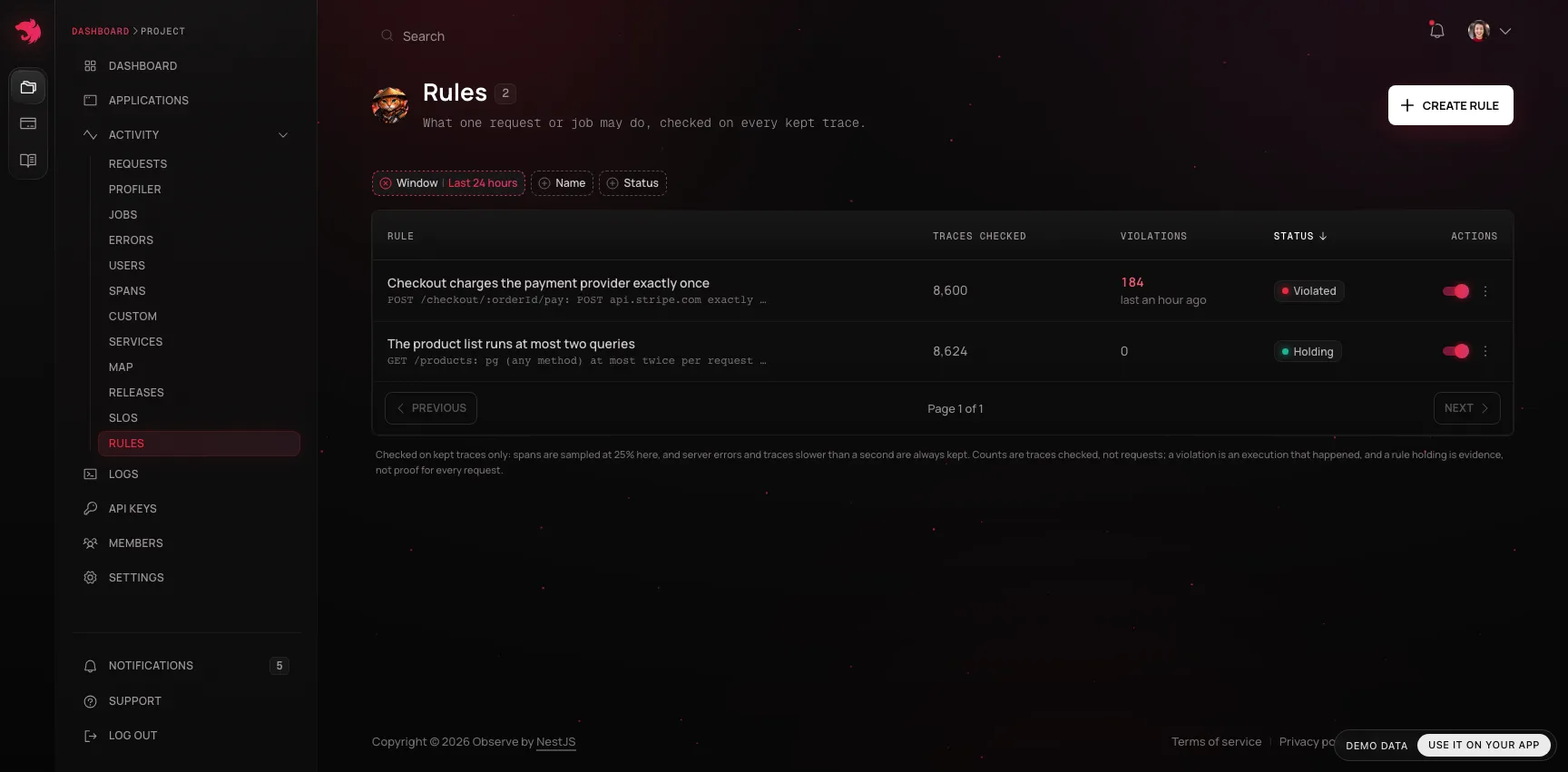
Checked on kept traces
Rules are checked by the trace worker on the traces it keeps, from the moment a rule is saved - never on earlier ones. Edits and switches take effect within about 30 seconds. What that means for the numbers:
- A violation is certain. It is an execution that happened, and its trace is a click away.
- A rule holding is evidence, not proof. Under span sampling, server errors and traces slower than a second are always kept and the rest at the keep rate, so the traces checked lean towards slow and failing ones. When at least three were checked and none broke the rule, the rule's page gives the rate it is likely under, at 95% - read it as indicative, since kept traces aren't a random sample.
- Counts are traces checked, not requests. A share of checked traces is not a share of requests.
- A thinned window says so. On a day when reduced ingest, an overage trim or daily pacing kept only notable traces, rules were checked on those alone, and while an overage is paused no trace is kept at all. The page warns above the numbers when that happened in the window.
The rules list
Each rule shows its sentence, the traces it was checked on, its violations and when the last one was, and its status:
| Status | Meaning |
|---|---|
| Failing | At least one checked trace broke the rule in the window |
| Passing | Checked, and never broken |
| No runs yet | No kept trace of the operation arrived, so the rule wasn't judged |
| Disabled | Switched off; the counts are from before |
The Window chip, beside the other filters, reads the last 24 hours or the last 7 days, as far back as your plan keeps data. The switch on each row turns a rule off and on without losing it. You delete a rule from the menu on its page; deleting one that alerts watch asks again, and takes those alerts with it.
A rule's page
The card at the top says whether the rule is failing, with today's runs, how many broke it and the last failure, beside its runs over the last 7 days. Below it, over the same 7 days:
- Traces that broke it - the newest violating traces, each with the calls it made and opening its waterfall.
- By release - checks and violations per release, with when each version started and stopped breaking the rule: which release broke it is usually the first question.
- Alerts - the alerts that watch the rule, and Create alert for one aimed at it.
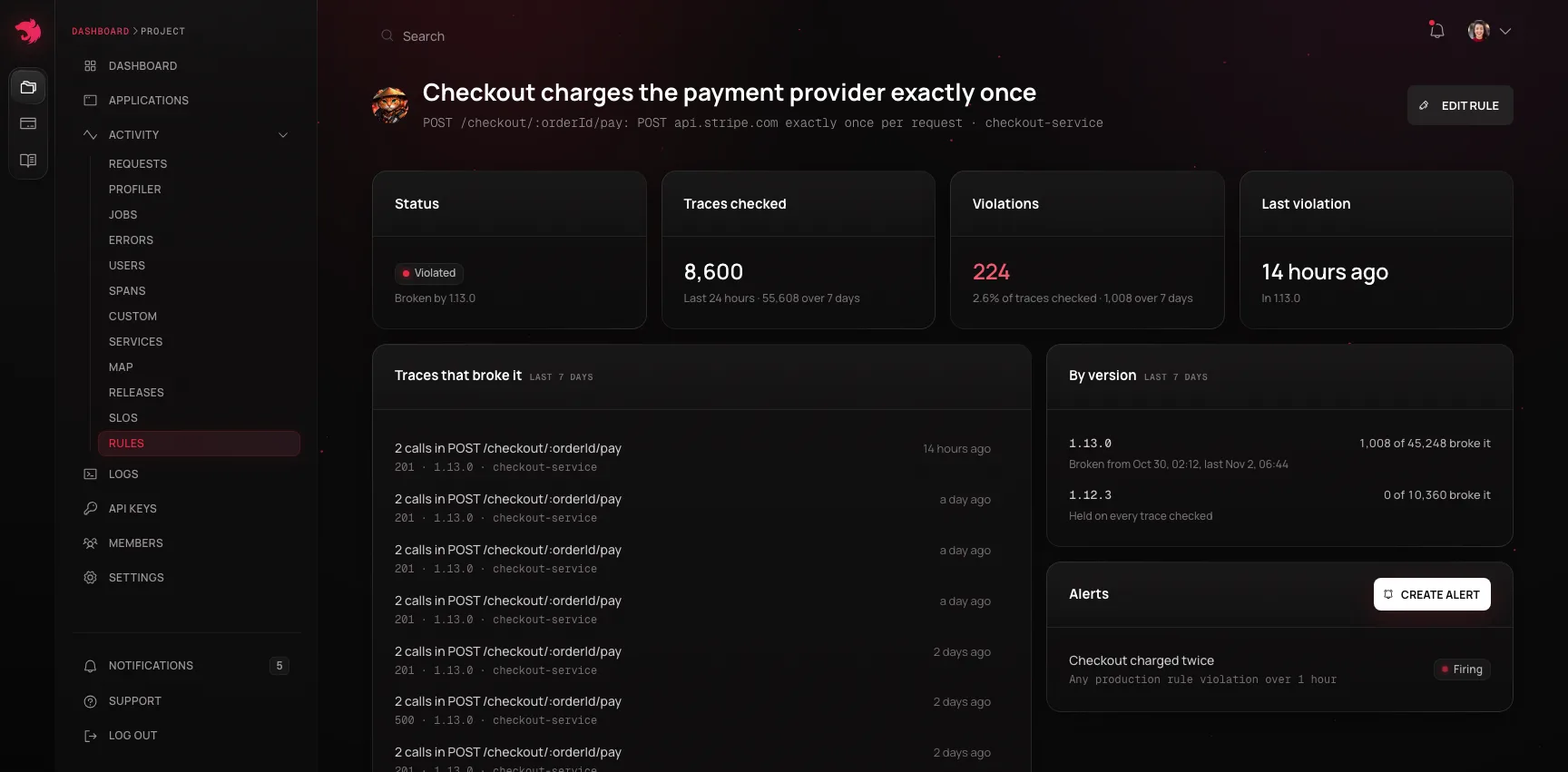
Alerts on a rule
Turn on Alert me when this rule breaks when you create a rule, and an alert is made with it: above 0 violations over an hour, severity High, in-app and by email to you. It fires on the first violating trace and resolves an hour after the last, once per episode - never a message per request.
Any alert rule can watch the Production rule violations metric, for one rule or for every rule in a project or application. Every paid plan includes both the rules and the alerts on them; when a plan lapses, those alerts are switched off with it.
From an agent
Over MCP, also on every paid plan, create_production_rule lets the agent that shipped a change pin what production must keep doing, while it still knows, and list_rule_violations reads the same report this page shows. Editing and deleting stay in the dashboard. A rule only reads the traces the SDK already sends; it never changes what the SDK captures.